What is
DHCP?

Dynamic
Host Configuration Protocol (DHCP) is a network protocol that enables a server
to automatically assign an IP address to a computer from a defined range of
numbers (i.e., a scope) configured for a given network.
How can I
prevent unauthorized laptops from using a network that uses DHCP for dynamic
addressing?
This
would have to be done using a mechanism other than DHCP. DHCP does not prevent
other clients from using the addresses it is set to hand out nor can it
distinguish between a computer’s permanent MAC address and one set by the
computer’s user. DHCP can impose no restrictions on what IP address can use a
particular port nor control the IP address used by any client.
Can a BOOTP
client boot from a DHCP server?
Only if the DHCP server
is specifically written to also handle BOOTP queries
What is the dhcp process for client machine?
1. A user turns on a computer with a DHCP client.
2. The client computer sends a broadcast request (called a DISCOVER or DHCPDISCOVER), looking for a DHCP server to answer.
3. The router directs the DISCOVER packet to the correct DHCP server.
4. The server receives the DISCOVER packet. Based on availability and usage policies set on the server, the server determines an appropriate address (if any) to give to the client. The server then temporarily reserves that address for the client and sends back to the client an OFFER (or DHCPOFFER) packet, with that address information. The server also configures the client's DNS servers, WINS servers, NTP servers, and sometimes other services as well.
5. The client sends a REQUEST (or DHCPREQUEST) packet, letting the server know that it intends to use the address.
6. The server sends an ACK (or DHCPACK) packet, confirming that the client has a been given a lease on the address for a server-specified period of time.
2. The client computer sends a broadcast request (called a DISCOVER or DHCPDISCOVER), looking for a DHCP server to answer.
3. The router directs the DISCOVER packet to the correct DHCP server.
4. The server receives the DISCOVER packet. Based on availability and usage policies set on the server, the server determines an appropriate address (if any) to give to the client. The server then temporarily reserves that address for the client and sends back to the client an OFFER (or DHCPOFFER) packet, with that address information. The server also configures the client's DNS servers, WINS servers, NTP servers, and sometimes other services as well.
5. The client sends a REQUEST (or DHCPREQUEST) packet, letting the server know that it intends to use the address.
6. The server sends an ACK (or DHCPACK) packet, confirming that the client has a been given a lease on the address for a server-specified period of time.
What is DHCP’s
purpose?
DHCP’s
purpose is to enable individual computers on an IP network to extract their
configurations from a server (the ‘DHCP server’) or servers, in particular,
servers that have no exact information about the individual computers until
they request the information. The overall purpose of this is to reduce the work
necessary to administer a large IP network. The most significant piece of
information distributed in this manner is the IP address.
Can DHCP support remote access?
PPP has
its own non-DHCP way in which communications servers can hand clients an IP
address called IPCP (IP Control Protocol) but doesn’t have the same flexibility
as DHCP or BOOTP in handing out other parameters. Such a communications server
may support the use of DHCP to acquire the IP addresses it gives out. This is
sometimes called doing DHCP by proxy for the client. I know that Windows NT’s
remote access support does this. A feature of DHCP under development
(DHCPinform) is a method by which a DHCP server can supply parameters to a
client that already has an IP number. With this, a PPP client could get its IP
number using IPCP, then get the rest of its parameters using this feature of
DHCP. SLIP has no standard way in which a server can hand a client an IP
address, but many communications servers support non-standard ways of doing
this that can be utilized by scripts, etc. Thus, like communications servers
supporting PPP, such communications servers could also support the use of DHCP
to acquire the IP addressees to give out. The DHCP protocol is capable of
allocating an IP address to a device without an IEEE-style MAC address, such as
a computer attached through SLIP or PPP, but to do so, it makes use of a
feature which may or may not be supported by the DHCP server: the ability of
the server to use something other than the MAC address to identify the client.
Communications servers that acquire IP numbers for their clients via DHCP run
into the same roadblock in that they have just one MAC address, but need to
acquire more than one IP address. One way such a communications server can get
around this problem is through the use of a set of unique pseudo-MAC addresses
for the purposes of its communications with the DHCP server. Another way (used
by Shiva) is to use a different “client ID type” for your hardware address.
Client ID type 1 means you’re using MAC addresses. However, client ID type 0
means an ASCII string.
What is dhcp scope ?
DHCP scopes are used to define ranges of addresses from
which a DHCP server can assign IP addresses to clients.

How can I
prevent unauthorized laptops from using a network that uses DHCP for dynamic
addressing?
This
would have to be done using a mechanism other than DHCP. DHCP does not prevent
other clients from using the addresses it is set to hand out nor can it
distinguish between a computer’s permanent MAC address and one set by the
computer’s user. DHCP can impose no restrictions on what IP address can use a
particular port nor control the IP address used by any client.
Can a BOOTP client boot from a DHCP server?
Only if
the DHCP server is specifically written to also handle BOOTP queries.
Types of scopes in windows dhcp ?
Normal
Scope - Allows A, B and C Class IP address ranges to be specified including
subnet masks, exclusions and reservations. Each normal scope defined must exist
within its own subnet. Multicast Scope - Used to assign IP address ranges for Class D networks. Multicast scopes do not have subnet masks, reservation or other TCP/IP options.
Multicast scope address ranges require that a Time To Live (TTL) value be specified (essentially the number of routers a packet can pass through on the way to its destination).
Superscope - Essentially a collection of scopes grouped together such that they can be enabled and disabled as a single entity.
Can DHCP work
with Apple Talk or IPX?
No, it
is too tied to IP. Furthermore, they don’t need it since they have always had
automated mechanisms for assigning their own network addresses.
What is a DHCP lease?
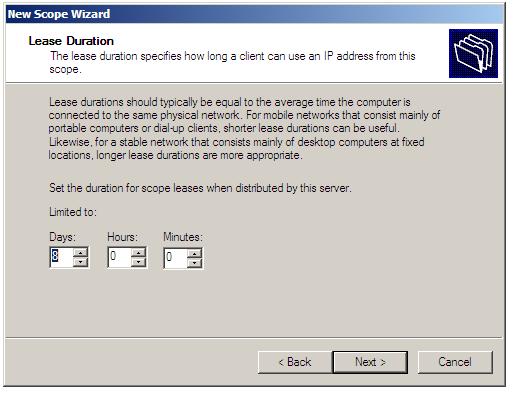
A DHCP lease is the
amount of time that the DHCP server grants to the DHCP client permission to use
a particular IP address. A typical server allows its administrator to set the
lease time.
What is DHCP
Spoofing?
Ascend
Pipeline ISDN routers (which attach Ethernets to ISDN lines) incorporate a
feature that Ascend calls “DHCP spoofing” which is essentially a tiny server
implementation that hands an IP address to a connecting Windows 95 computer,
with the intention of giving it an IP number during its connection process
What is Authorizing DHCP Servers in Active
Directory ?
If a DHCP server is to operate within an Active Directory domain (and is not running on a domain controller) it must first be authorized.
This can be achieved either as part of the DHCP Server role installation, or subsequently using either DHCP console or at the command prompt using the netsh tool.
If the DHCP server was not authorized during installation, invoke the DHCP console (Start -> All Programs -> Administrative Tools -> DHCP),
right click on the DHCP to be authorized and select Authorize. To achieve the same result from the command prompt, enter the following command:
netsh dhcp server serverID initiate auth
In the above command syntax, serverID is replaced by the IP address or full UNC name of system on which the DHCP server is installed.
If a DHCP server is to operate within an Active Directory domain (and is not running on a domain controller) it must first be authorized.
This can be achieved either as part of the DHCP Server role installation, or subsequently using either DHCP console or at the command prompt using the netsh tool.
If the DHCP server was not authorized during installation, invoke the DHCP console (Start -> All Programs -> Administrative Tools -> DHCP),
right click on the DHCP to be authorized and select Authorize. To achieve the same result from the command prompt, enter the following command:
netsh dhcp server serverID initiate auth
In the above command syntax, serverID is replaced by the IP address or full UNC name of system on which the DHCP server is installed.
How long should a lease be?
A very
relevant factor is that the client starts trying to renew the lease when it is
halfway through: thus, for example, with a 4 day lease, the client which has
lost access to its DHCP server has 2 days from when it first tries to renew the
lease until the lease expires and the client must stop using the network.
During a 2- day outage, new users cannot get new leases, but no lease will
expire for any computer turned on at the time that the outage commences.
Another factor is that the longer the lease the longer time it takes for client
configuration changes controlled by DHCP to propogate.
Is a DHCP client “supposed to” be able to use a BOOTP server?
The RFC
on such interoperability (1534) is clear: “A DHCP client MAY use a reply from a
BOOTP server if the configuration returned from the BOOTP server is acceptable
to the DHCP client.” (section 3). The word “MAY” indicates such support,
however useful, is left as an option.
What is a
Client ID?
What is
termed the Client ID for the purposes of the DHCP protocol is whatever is used
by the protocol to identify the client computer. By default, DHCP
implementations typically employ the client’s MAC address for this purpose, but
the DHCP protocol allows other options. Some DHCP implementations have a setup option
to specify the client ID you want. One alternative to the MAC address is simply
a character string of your choice. In any case, in order for DHCP to function,
you must be certain that no other client is using the client ID you choose, and
you must be sure the DHCP server will accept it.
What is DHCPINFORM?
DHCPInform is a DHCP message used by DHCP clients to obtain DHCP options. While PPP remote access clients do not use DHCP to obtain IP addresses for the remote access connection, Windows 2000 and Windows 98 remote access clients use the DHCPInform message to obtain DNS server IP addresses, WINS server IP addresses, and a DNS domain name.
DHCPInform is a DHCP message used by DHCP clients to obtain DHCP options. While PPP remote access clients do not use DHCP to obtain IP addresses for the remote access connection, Windows 2000 and Windows 98 remote access clients use the DHCPInform message to obtain DNS server IP addresses, WINS server IP addresses, and a DNS domain name.
The DHCPInform message is sent after the IPCP negotiation is
concluded. The DHCPInform message received by the remote access server is then
forwarded to a DHCP server. The remote access server forwards DHCPInform
messages only if it has been configured with the DHCP Relay Agent.
How can I relay DHCP if my router does not support it?
A server
on a net(subnet) can relay DHCP or BOOTP for that net. Microsoft has software
to make Windows NT do this.
Is a DHCP server “supposed to” be able to support a BOOTP client?
The RFC
on such interoperability (1534) is clear: “In summary, a DHCP server:
… MAY support BOOTP clients,” (section 2). The word “MAY” indicates such support, however useful, is left as an option.
A source of confusion on this point is the following statement in section 1.5 of RFC 1541: “DHCP must provide service to existing BOOTP clients.” However, this statement is one in a list of “general design goals for DHCP”, i.e. what the
designers of the DHCP protocol set as their own goals. It is not in a list of requirements for DHCP servers.
… MAY support BOOTP clients,” (section 2). The word “MAY” indicates such support, however useful, is left as an option.
A source of confusion on this point is the following statement in section 1.5 of RFC 1541: “DHCP must provide service to existing BOOTP clients.” However, this statement is one in a list of “general design goals for DHCP”, i.e. what the
designers of the DHCP protocol set as their own goals. It is not in a list of requirements for DHCP servers.
Can DHCP support statically defined addresses?
Yes. At
least there is nothing in the protocol to preclude this and one expects it to
be a feature of any DHCP server. This is really a server matter and the client
should work either way. The RFC refers to this as manual allocation.
What is a MAC address?
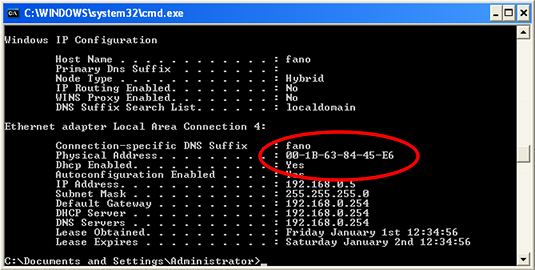
A MAC
address (also called an Ethernet address or an IEEE MAC address) is a number
(typically written as twelve hexadecimal digits, 0 through 9 and A through F,
or as six hexadecimal numbers separated by periods or colons, i.e.
0080002012ef, 0:80:0:2:20:ef) which uniquely identifes a computer that has an
Ethernet interface. Unlike the IP number, it includes no indication of where
your computer is located. In DHCP’s typical use, the server uses a requesting
computer’s MAC address to uniquely identify it.
Can a DHCP server back up another DHCP server?
You can
have two or more servers handing out leases for different addresses. If each
has a dynamic pool accessible to the same clients, then even if one server is
down, one of those clients can lease an address from the other server. However,
without communication between the two servers to share their information on
current leases, when one server is down, any client with a lease from it will
not be able to renew their lease with the other server. Such communication is
the purpose of the “server to server protocol” (see next question). It is
possible that some server vendors have addressed this issue with their own
proprietary server-to-server communication.
What protocol and port does DHCP use?
DHCP,
like BOOTP runs over UDP, utilizing ports 67 and 68.
What ports are used by DHCP and the DHCP clients ?
Requests are on UDP port 68, Server replies on UDP 67 .
Requests are on UDP port 68, Server replies on UDP 67 .
Benefits of using DHCP
DHCP provides the following benefits for administering your TCP/IP-based network:
Safe and reliable configuration. DHCP avoids configuration errors caused by the need to manually type in values at each computer. Also, DHCP helps prevent address conflicts caused by a previously assigned IP address being reused to configure a new computer on the network.
Reduces configuration management.
DHCP provides the following benefits for administering your TCP/IP-based network:
Safe and reliable configuration. DHCP avoids configuration errors caused by the need to manually type in values at each computer. Also, DHCP helps prevent address conflicts caused by a previously assigned IP address being reused to configure a new computer on the network.
Reduces configuration management.
Using DHCP servers can greatly decrease time spent to
configuring and reconfiguring computers on your network. Servers can be
configured to supply a full range of additional configuration values when
assigning address leases. These values are assigned using DHCP options. Also,
the DHCP lease renewal process helps assure that where client configurations
need to be updated often (such as users with mobile or portable computers who
change locations frequently), these changes can be made efficiently and
automatically by clients communicating directly with DHCP servers.
The following section covers issues that affect the use of the
DHCP Server service with other services or network configurations. Using DNS
servers with DHCP Using Routing and Remote Access servers with DHCP Multihomed
DHCP servers.
Describe the process of installing a DHCP server in an AD
infrastructure?
Open Windows Components Wizard. Under Components , scroll to and click Networking Services. Click Details . Under Subcomponents of Networking Services , click Dynamic Host Configuration Protocol (DHCP) and then click OK .
Open Windows Components Wizard. Under Components , scroll to and click Networking Services. Click Details . Under Subcomponents of Networking Services , click Dynamic Host Configuration Protocol (DHCP) and then click OK .
Click Next . If
prompted, type the full path to the Windows Server 2003 distribution files, and
then click Next. Required files are copied to your hard disk.
How to authorize a DHCP server in Active Directory Open DHCP?
In the console tree, click DHCP
. On the Action menu, click Manage authorized servers.
. The Manage Authorized Servers dialog box appears. Click Authorize.
. When prompted, type the name or IP address of the DHCP server to be authorized, and then click OK.
In the console tree, click DHCP
. On the Action menu, click Manage authorized servers.
. The Manage Authorized Servers dialog box appears. Click Authorize.
. When prompted, type the name or IP address of the DHCP server to be authorized, and then click OK.
Describe the integration between DHCP and DNS?
Traditionally, DNS and DHCP servers have been configured and managed one at a time. Similarly, changing authorization rights for a particular user on a group of devices has meant visiting each one and making configuration changes.
DHCP integration with DNS allows the aggregation of these tasks
across devices, enabling a company's network services to scale in step with the
growth of network users, devices, and policies, while reducing administrative
operations and costs. This integration provides practical operational
efficiencies that lower total cost of ownership.
Creating a DHCP network automatically creates an associated DNS
zone, for example, reducing the number of tasks required of network
administrators. And integration of DNS and DHCP in the same database instance
provides unmatched consistency between service and management views of IP
address-centric network services data.
How DHCP works and
DHCP Interview Questions and Answers
How DHCP Works?
Before learning the
process through which DHCP achieves it’s goal, we first have to understand the
different messages that are used in the process.
1. DHCPDISCOVER
It is a DHCP
message that marks the beginning of a DHCP interaction between client and
server. This message is sent by a client (host or device connected to a
network) that is connected to a local subnet. It’s a broadcast message that
uses 255.255.255.255 as destination IP address while the source IP address is
0.0.0.0
2. DHCPOFFER
It is DHCP message
that is sent in response to DHCPDISCOVER by a DHCP server to DHCP client. This
message contains the network configuration settings for the client that sent
the DHCPDISCOVER message.
3. DHCPREQUEST
This DHCP message
is sent in response to DHCPOFFER indicating that the client has accepted the
network configuration sent in DHCPOFFER message from the server.
4. DHCPACK
This message is
sent by the DHCP server in response to DHCPREQUEST recieved from the client.
This message marks the end of the process that started with DHCPDISCOVER. The
DHCPACK message is nothing but an acknowledgement by the DHCP server that
authorizes the DHCP client to start using the network configuration it received
from the DHCP server earlier.
5. DHCPNAK
This message is the
exact opposite to DHCPACK described above. This message is sent by the DHCP
server when it is not able to satisfy the DHCPREQUEST message from the client.
6. DHCPDECLINE
This message is
sent from the DHCP client to the server in case the client finds that the IP
address assigned by DHCP server is already in use.
7. DHCPINFORM
This message is
sent from the DHCP client in case the IP address is statically configured on
the client and only other network settings or configurations are desired to be
dynamically acquired from DHCP server.
8. DHCPRELEASE
This message is
sent by the DHCP client in case it wants to terminate the lease of network
address it has be provided by DHCP server.

Now as we know
about the various DHCP messages, it’s time to go through the the complete DHCP
process to give a better Idea of how DHCP works. Note that the steps mentioned
below assume that DHCP functionality is enabled by default on the client side.
Here are the steps
:
§ Step 1: When the
client computer (or device) boots up or is connected to a network, a
DHCPDISCOVER message is sent from the client to the server. As there is no
network configuration information on the client so the message is sent with
0.0.0.0 as source address and 255.255.255.255 as destination address. If the DHCP
server is on local subnet then it directly receives the message or in case it
is on different subnet then a relay agent connected on client’s subnet is
used to pass on the request to DHCP server. The transport protocol used for
this message is UDP and the port number used is 67. The client enters the
initializing stage during this step.
§ Step 2: When the DHCP
server receives the DHCPDISCOVER request message then it replies with a
DHCPOFFER message. As already explained, this message contains all the network
configuration settings required by the client. For example, the yaddr field of
the message will contain the IP address to be assigned to client. Similarly the
the subnet mask and gateway information is filled in the options field. Also,
the server fills in the client MAC address in the chaddr field. This message is
sent as a broadcast (255.255.255.255) message for the client to receive it
directly or if DHCP server is in different subnet then this message is sent to
the relay agent that takes care of whether the message is to be passed as
unicast or broadcast. In this case also, UDP protocol is used at the transport
layer with destination port as 68. The client enters selecting stage during
this step
§ Step 3: The client
forms a DHCPREQUEST message in reply to DHCPOFFER message and sends it to the
server indicating it wants to accept the network configuration sent in the
DHCPOFFER message. If there were multiple DHCP servers that received
DHCPDISCOVER then client could receive multiple DHCPOFFER messages. But, the
client replies to only one of the messages by populating the server
identification field with the IP address of a particular DHCP server. All the
messages from other DHCP servers are implicitly declined. The DHCPREQUEST
message will still contain the source address as 0.0.0.0 as the client is still
not allowed to use the IP address passed to it through DHCPOFFER message. The
client enters requesting stage during this step.
§ Step 4: Once the
server receives DHCPREQUEST from the client, it sends the DHCPACK message
indicating that now the client is allowed to use the IP address assigned to it.
The client enters the bound state during this step.
The Concept of
Lease
With all the
necessary information on how DHCP works, one should also know that the IP
address assigned by DHCP server to DHCP client is on a lease. After the lease
expires the DHCP server is free to assign the same IP address to any other host
or device requesting for the same. For example, keeping lease time 8-10 hours
is helpful in case of PC’s that are shut down at the end of the day. So,
lease has to be renewed from time to time. The DHCP client tries to renew the
lease after half of the lease time has expired. This is done by the exchange of
DHCPREQUEST and DHCPACK messages. While doing all this, the client enters the
renewing stage.

No comments:
Post a Comment